



Which Rental Businesses Use Fleet Calendar?
Essential for any rental business managing fleet availability and team scheduling
Car Rental
Auto rental companies managing daily bookings and complex vehicle rotations
Motorcycle Rental
Motorbike rental with seasonal peaks and diverse booking patterns
Scooter Rental
High-volume scooter networks with rapid booking turnover and hourly slots
Bike Rental
Bicycle and e-bike fleets requiring precise slot management across zones
Van Rental
Minivan and cargo van fleets with mixed duration rentals and complex logistics
ATV & Boat Rental
Adventure and water sports businesses with multi-day tours and group bookings
Calendar works for single-location shops and multi-city networks alike.
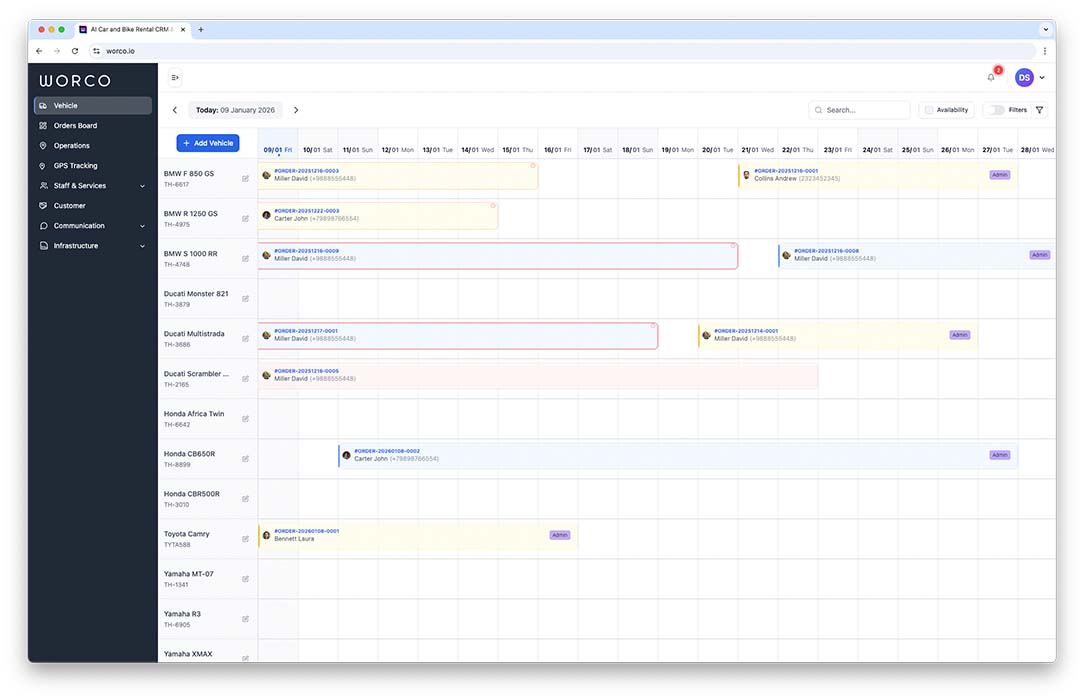
How Calendar Prevents Double-Bookings
WorCo Calendar shows every vehicle's availability in one visual timeline. When a booking is created, the vehicle is instantly blocked for those dates. The calendar and booking system work as one:
- See all vehicles and their status at a glance
- Drag-and-drop bookings to reschedule instantly
- Real-time conflict detection prevents overbooking
- Automatic sync across all team members and locations
- Maintenance and repair windows block vehicles automatically
Why Fleet Calendar Matters
Visual control replaces spreadsheets and confusion
Real-Time Sync Across Locations
Every team member sees the same calendar instantly. When a booking is made in one location, all other locations see it immediately — no delayed updates or conflicts.
Zero Double-Bookings
The calendar and booking system are integrated at the database level. A vehicle can't be booked twice for the same dates — the system makes it technically impossible.
Team Visibility & Coordination
All team members see who booked what vehicle when. Managers can assign tasks, track maintenance windows, and ensure no vehicle sits idle while others are overbooked.
Multi-Location Synchronization
Running multiple rental locations? WorCo Calendar syncs all vehicles across all branches in real-time. Managers see the entire network and can rebalance fleet as needed without constant calls.
Conflict Prevention at Database Level
Unlike spreadsheets or simple calendar apps, WorCo prevents double-bookings at the database layer. Even if two people try to book the same vehicle simultaneously, only one succeeds.
Drag-and-Drop Rescheduling
Need to move a booking? Drag it to a different vehicle or date, and the system automatically checks conflicts. If there's an issue, it alerts you immediately with alternatives.
Fleet Utilization Analytics
See which vehicles are booked most, which have idle gaps, and which bring in the most revenue. Use calendar data to optimize pricing and find underperforming assets.
Frequently Asked Questions About Calendar
Common questions about fleet scheduling and availability management
Does the calendar work for multi-location businesses?
Yes, WorCo calendar syncs across all your locations in real-time. Managers in different cities see the same fleet availability, and when a booking is made in one location, it instantly updates everywhere — across all branches simultaneously.
How does the calendar prevent double-bookings?
The calendar integrates directly with the booking system. When a vehicle is booked, it's automatically blocked for those dates at the database level. No conflicts can occur — the system makes it technically impossible to double-book.
Can teams work offline and sync later?
WorCo calendar supports offline mode. When you're offline, changes are cached locally and automatically sync once connection is restored. Your team won't miss updates and changes will merge seamlessly.
Do all team members need access to the calendar?
Yes, shared team access is essential for preventing miscommunication. Every team member sees the same real-time calendar view. Access can be controlled per user role (view-only, edit, admin).
Can I see maintenance windows in the calendar?
Yes, maintenance, inspections, repairs, and cleaning windows automatically block vehicles from the calendar. Vehicles marked as 'Under Maintenance' appear as unavailable during those periods.
How do I handle unexpected availability changes?
The calendar shows real-time status for each vehicle. If a booking is cancelled or a vehicle becomes available early, the calendar updates instantly and can send alerts to your team and interested customers.
Related WorCo Features
Booking Management
Create and track all reservations in one database with automatic calendar synchronization.
Kanban Workflow
Visualize booking status with drag-and-drop columns for team workflow management.
Fleet Registry
Manage vehicle details, maintenance history, and asset tracking alongside calendar bookings.
Stop Managing Fleet in Spreadsheets
Get real-time calendar visibility with zero double-bookings and automatic team sync.
Get Started Free