



Which Rental Businesses Use Kanban?
Essential for teams managing complex booking workflows and multiple staff members
Car Rental
Large car rental teams coordinating pickups, cleanings, and multi-location operations
Motorcycle Rental
Motorcycle rental operations with multiple staff managing daily bookings and tours
Scooter Rental
High-volume scooter networks with rapid turnover requiring real-time task coordination
Bike Rental
Bike rental shops coordinating multiple staff across pickup/return/maintenance cycles
Van Rental
Van rental companies managing complex multi-day bookings and team scheduling
ATV & Boat Rental
Adventure businesses coordinating guides, equipment, and group bookings visually
Kanban works best for teams with 2+ people coordinating rental workflows.
How Kanban Visualizes Rental Workflows
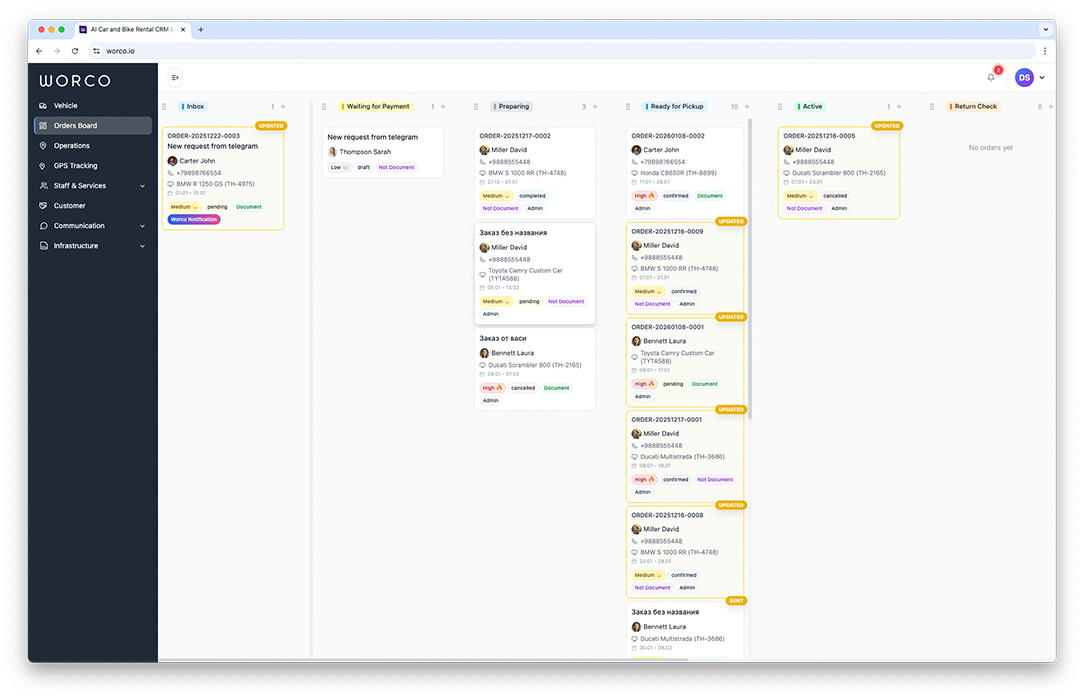
Kanban board shows every booking as a card, organized by status. Managers drag cards between columns to update status, assign to team members, and track progress — all without writing a single message:
- Bookings appear automatically from AI Chat, website, or manual entry
- Drag-drop cards to change status instantly with automatic notifications
- Assign bookings to team members and see their personal workload
- Custom columns match your exact rental workflow and processes
- Complete history logs every change for accountability and insights
Why Kanban Improves Team Workflow
Visual task management replaces endless messages and status updates
Visual Workflow & Process Control
See entire rental workflow at a glance. No more wondering about booking status — cards flow from New → Confirmed → Released → Completed visually and automatically.
Team Collaboration & Assignments
Assign bookings to specific team members instantly. Assignees get notifications, see their personal tasks, and the entire team knows who's responsible for each booking.
Status Tracking & Accountability
Every status change is logged automatically with timestamp and user info. Know exactly who moved what when, and trace the complete history of any booking.
Custom Workflow Columns
Don't fit a pre-built workflow? Create custom columns for your exact rental process. Default: New → Confirmed → Released → In Progress → Completed, but fully customizable.
Team Role Management
Assign roles with different permissions. Receptionists create bookings, mechanics mark maintenance complete, managers oversee all columns — everyone sees what they need to see.
Automatic Status Notifications
When a booking moves between columns, customers and team members are automatically notified. No manual messaging — status changes trigger alerts automatically.
Workflow Analytics & Bottleneck Detection
See how long bookings stay in each column. Identify bottlenecks (e.g., too many bookings stuck in "Confirmed") and optimize team capacity.
Frequently Asked Questions About Kanban
Common questions about workflow visualization and team management
Can I create custom columns in the Kanban board?
Yes, WorCo Kanban supports custom workflow stages. Default columns are New → Confirmed → Released → In Progress → Completed, but you can customize them completely to match your specific rental business process.
How does drag-and-drop workflow improve team productivity?
Instead of updating spreadsheets or sending messages about status changes, managers drag bookings between columns to reflect current status. The system automatically notifies customers and team members about updates.
Can I assign bookings to specific team members?
Yes, each booking can be assigned to a team member. Assignments trigger notifications, and team members see their personal workload and tasks. Reassignments are instantly visible to the whole team.
How does the board track booking status and changes?
Every status change is automatically logged with timestamp and user information. Complete change history is available for each booking, showing exactly who made changes, when, and in what order.
Can I filter bookings by vehicle type or customer?
Yes, Kanban board supports multiple filters: by vehicle type, customer, date range, assigned team member, or status. Filters help you focus on relevant bookings without viewing the entire workflow at once.
How does Kanban integrate with AI Chat and calendar?
AI Chat automatically creates bookings that land in the 'New' column. Calendar shows visual timeline of bookings. Kanban tracks workflow status. Together they cover the entire lifecycle of each rental.
Related WorCo Features
Booking Management
Create and track reservations that feed directly into Kanban board columns automatically.
Fleet Calendar
Visual timeline showing all vehicles and their booking dates — complements Kanban workflow view.
AI Chat
Automatic booking creation from WhatsApp/Telegram — bookings appear instantly in Kanban 'New' column.
Visualize Your Rental Workflow
Replace status messages with visual Kanban board that keeps your team aligned.
Get Started Free