
Kanban Workflow for Vehicle Rental Management
In vehicle rental business, the key problem isn't lack of customers — it's loss of process control. Requests come from messengers, website, marketplaces. Managers record agreements in chats, spreadsheets, or notepads. The result — confusion, forgotten bookings, double releases, and idle vehicles.
Kanban workflow in WorCo solves this problem by transforming rental management into a transparent, visual, and automated process.
🚗 Rental Types Using Kanban
Flexible funnels for any rental business type:
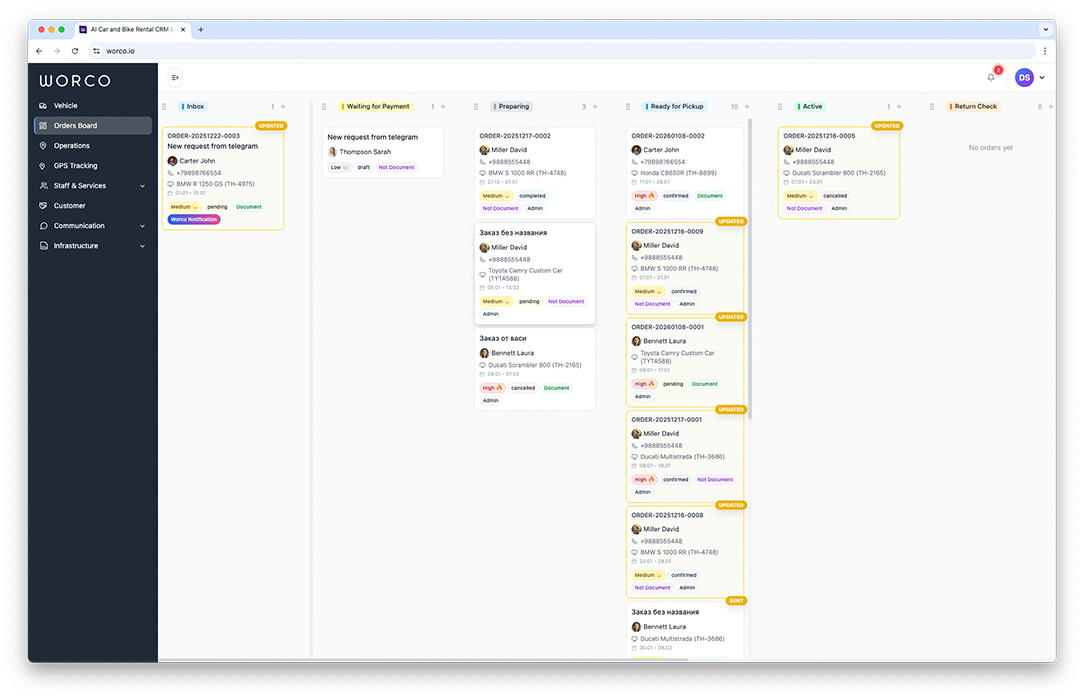
What is Kanban in WorCo and Why Rentals Need It
In vehicle rental context, Kanban isn't just a status board. It's a live model of your business where each booking is a card following a clear path from first customer contact to rental completion.
Each order card contains:
- Customer and communication history (including messengers)
- Rental dates and times
- Assigned vehicle
- Payment and deposit status
- Current processing stage
All orders are visually distributed across columns reflecting real business stages:
New Request → Confirmed → Preparation → Released → On Rent → Return → Completed
Drag & Drop Management: Faster and Error-Free
Main advantage of WorCo Kanban board — Drag & Drop control. Order status changes by simply dragging cards between columns.
This provides three key effects:
Work Speed
Manager processes orders multiple times faster. One gesture replaces several steps.
Fewer Errors
Statuses aren't forgotten. Each order is always in specific process stage.
Owner Control
One glance enough to understand fleet load and bottlenecks.
Automation on Status Changes
In WorCo, status change isn't just visual action. It's an automation trigger.
Thus Kanban directly connects with communication, bookings, and fleet management.
Calendar and Fleet Integration
Kanban workflow in WorCo doesn't exist separately from calendar and fleet. Every card movement automatically synchronizes with Timeline calendar.
This means:
- Impossible double bookings — calendar updates instantly
- Automatic vehicle blocking for needed dates
- Instant vehicle release on cancellation or completion
- Visual fleet load in real-time
System always remains single source of truth — for managers, owner, and automated processes.
Process Analytics and Bottlenecks
Kanban workflow provides data impossible to get with manual management:
- 📊How long order stays at each stage
- 📉Where customers most often drop off
- ⚙️How effectively team works
- 🚗Where vehicles idle and why
This analytics allows optimizing processes rather than acting on feelings.
Frequently Asked Questions About Kanban Workflow
🎯Can we customize stages (columns) for our business?
Yes, funnels are fully customizable. You can create your own columns like "Awaiting Documents", "At Wash", "Needs Repair". For different vehicle types (cars, motorcycles, boats) you can set up separate funnels with unique logic.
🔔What happens when moving a card to another column?
Status change triggers automatic actions: customer notifications, calendar updates, vehicle availability changes in fleet. You can configure triggers for your processes — for example, send reminder 2 hours before release.
👥Can multiple managers work with one board simultaneously?
Yes, Kanban updates in real-time for all users. If one manager moved a card, others see changes instantly. This is especially important for teams with multiple offices or remote employees.
📱Does Kanban work on mobile devices?
Yes, interface is fully responsive. Managers can control orders from tablets and smartphones directly from parking or release office. Drag-and-drop works on touch screens as conveniently as on desktop.